
10x More Efficient Than Rote Memorization: Unveiling the Cornell Note-Taking Method and Ebbinghaus's Forgetting Curve (with Free Templates)
Have you ever experienced this: taking meticulous notes during class, feeling like you understood everything at the time, only to find it all vanished from your memory two days later? Or, for an important exam, you go over the entire textbook repeatedly, yet the key points remain a blurry mess in your mind?
If these scenarios sound familiar, you might be trapped in the "inefficient diligence" pitfall. I was once a "victim" of this trap during my college years. To pass a dense Theoretical Physics course, I handwritten three notebooks' worth of notes and stayed up all night for a week before the exam. The result? I barely passed, and the knowledge I had "memorized" evaporated the moment the exam ended.
This frustration led me to reflect: the problem wasn't a lack of effort, but the method of learning. Fortunately, I later discovered two powerful learning tools—the Cornell Note-Taking Method and the Ebbinghaus Forgetting Curve. They completely transformed my learning trajectory, turning me from a student who relied on rote memorization into an efficient builder of knowledge systems.
Today, I want to share these two "secret weapons" with you.
The Art of Organizing Thoughts: The Cornell Note-Taking Method
The Cornell Note-Taking Method was developed by Walter Pauk, an education professor at Cornell University. It’s designed to help students record, organize, and review notes more effectively. It’s not just about recording; it’s an active thinking process.
The core of this method lies in its unique page layout. A single sheet is divided into three areas:
- Notes Area: The largest section, used for recording class content, reading notes, etc.
- Cues Area: The narrow section on the left, used for distilling keywords, questions, or main points.
- Summary Area: The section at the bottom, used for summarizing the entire page's content in your own words.
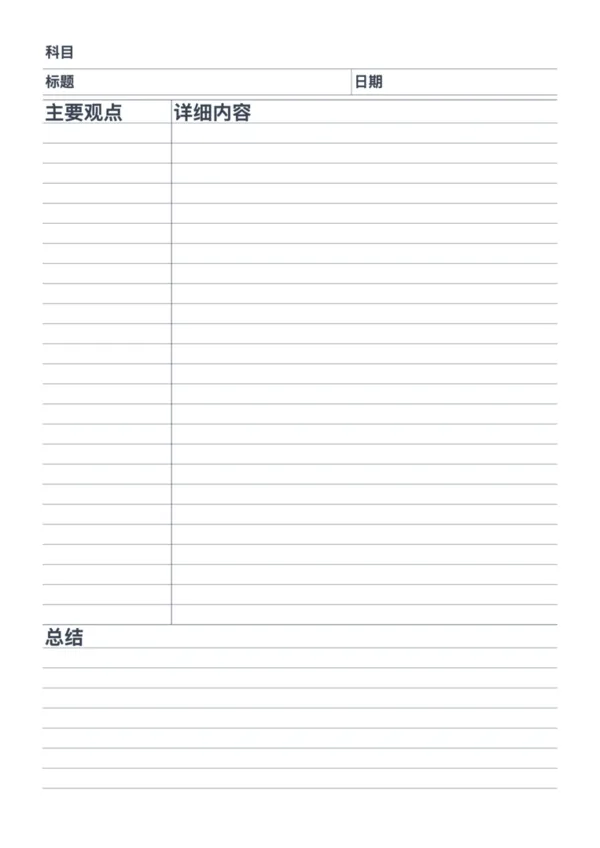
Generate printable Cornell Notes with a dedicated header for subjects, topics, and dates. Perfect for students, meetings, and academic research. Download your custom PDF instantly.